Your PTE Success Starts Here
Master Every Section of PTE Academic
SPEAKING SECTION
Speaking
PTE PRO’s Speaking section is loaded with AI-driven tools to improve your pronunciation, fluency, content, and overall delivery. From the first task to the last, you’ll get real-time analytics and alerts.
Read Aloud
This task isn’t just about reading the text—it’s about how you read it. PTE PRO gives you a complete fluency workout on every Read Aloud.
What We Analyze
- Words-Per-Minute (WPM): Shows if you were in the ideal speed range (130-150 WPM)
- Micropauses: Warns if you hesitated too frequently
- Chunking Visualization: Displays your speech in phrases to show rhythm
- Sentence Pausing: Flags if you paused too long or too short at periods (ideal: 0.5-0.8 seconds)
- Pitch Meter: Visual graph showing your intonation pattern
The Result
Read Aloud on PTE PRO doesn’t just score you; it coaches you in real time on how to sound fluent and clear.
Repeat Sentence
Widely regarded as one of the hardest speaking tasks, Repeat Sentence becomes much more manageable with PTE PRO’s help.
Threshold Scorer (2-out-of-3 Rule)
Our system calculates the infamous 2-out-of-3 rule for content scoring. In the real PTE, if you repeat at least 50% of the sentence correctly, you can still get 2 out of 3 content points.
- Safe Zone Result:
“Content: 2/3 – You were safely above the 50% mark”
Color-Coded Transcript
Your spoken sentence will be shown with words highlighted:
- Green – Correct word in correct sequence
- Orange – Slightly off pronunciation
- Red – Missing or wrong word
This sequence matching visualization is crucial—it shows not only what you got right or wrong, but whether you said the words in the correct order.
Describe Image & Retell Lecture
These open-ended speaking tasks are where template use used to be rampant—and where PTE PRO’s AI Template Detector will be your guide (and watchdog!).
Real-Time Template Detection
Our system calculates the infamous 2-out-of-3 rule for content scoring. In the real PTE, if you repeat at least 50% of the sentence correctly, you can still get 2 out of 3 content points.
- Orange Warning Zone
“Careful: Your answer looks like a template.”
Inject more real content now!
- Red Penalty
“Careful: Your answer looks like a template.”
Inject more real content now!
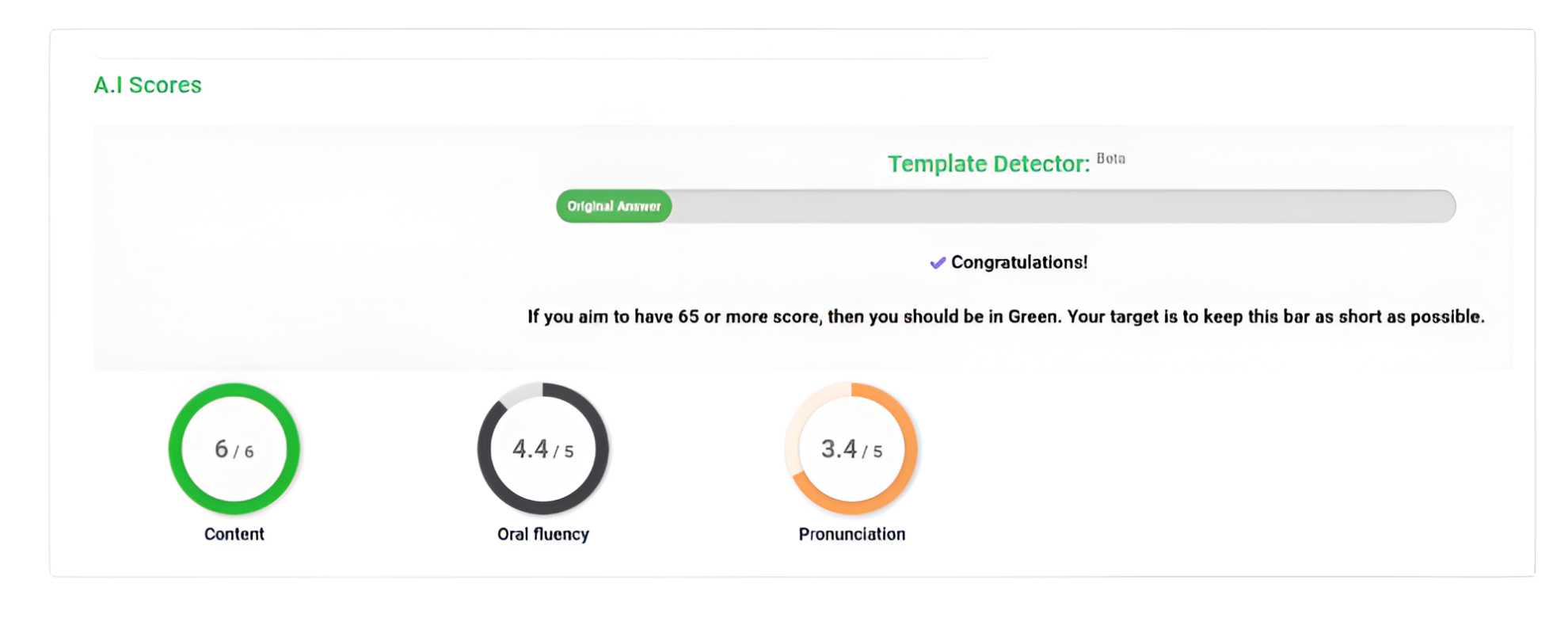
Complete Scoring Breakdown
Get detailed feedback on all scoring parameters:
Content
/3
Fluency
/2
Pronunciation
/2
The portal acts as a firewall to protect you from yourself—it stops you from developing bad habits like overusing fillers and guides you to describe what you actually see or hear with original sentences.
Answer Short Question
For this brief task, PTE PRO auto-scores your response and ensures you get credit if correct. The innovation here is in the scoring integration.
- Key Feature: Listening Score Contribution
Answer Short Questions contribute exclusively to your Listening score in the real exam—not Speaking. Our platform reflects this accurately in its scoring, ensuring you understand where your points actually come from.
- Important: Despite being in the Speaking section, this task does NOT contribute to your Speaking score. Focus on answering correctly to boost your Listening score.
Respond to a Speaking Prompt (Respond to a Situation)
One of the new speaking tasks where many test-takers trip up by mistakenly reading the prompt word-for-word instead of actually responding.
AI Repetition Detector
If you start to read the situation text verbatim, you’ll see an instant Red alert:
- "Too similar to the prompt"
Original answer required – 0/6 Content
- Original Response Detected
Green confirmation – you did it right!
The Benefit
By exam day, you’ll be conditioned to quickly comprehend the situation and speak a relevant answer in your own words, which is exactly what the PTE exam is looking for.
Summarize Group Discussion
A new task type where you listen to a group discussion and then summarize it. This is a challenging task, akin to a mix of Retell Lecture and Summarize Spoken Text.
- Template/Penalty Detector Active:
If you deliver a generic or memorized spiel, the system will flash warnings and potentially drop your score to zero.
PTE PRO forces you to actively listen to the discussion and pick out key points, rather than regurgitating a one-size-fits-all summary.
WRITING SECTION
Writing
The Writing section is where PTE PRO’s AI truly shines in giving constructive, educational feedback. We don’t just correct your mistakes; we teach you how to write answers that meet PTE’s exacting standards.
Summarize Written Text (SWT)
This task can be tricky—you need to condense a whole passage into one sentence. PTE PRO acts like your personal writing tutor here.
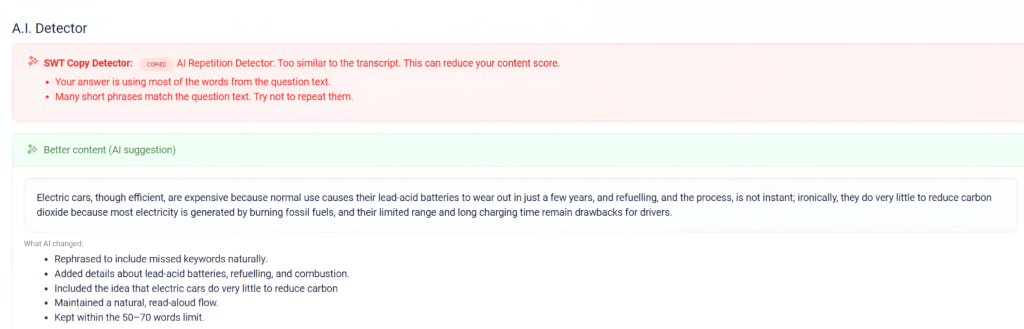
SWT Copy Detector & Keyword Suggester
The moment you submit your summary, our AI analyzes it for originality and keyword coverage:
- AI Repetition Detector
“Too similar to the transcript. This can reduce your content score.”
- Better Content (AI Suggestion)
AI suggests rephrased content that includes missed keywords naturally.
Scoring Breakdown
We provide numerical scores for:
- Content: Out of 4 points
- Form: Out of 2 points (word limit & sentence structure)
- Grammar: Out of 2 points
- Vocabulary: Out of 2 points
Write Essay
Essay writing is where many PTE takers either shine or stumble, and PTE PRO is determined to make you shine. Our Context-Aware Essay Grader doesn’t just count grammar errors; it critically examines content relevance and structure.
Template & Relevance Check
If your essay is full of generic sentences, the system flags it:
- Red Alert:
“AI thinks this answer may be a memorised template or not relevant enough.”
The grader highlights exactly which sentences triggered this alert, showing you what to remove or improve.
AI Essay Enhancer
The system offers rewritten examples:
- Your sentence:
“Pollution is bad for health.”
- AI suggestion:
“Furthermore, rising pollution levels pose a severe threat to public health, leading to respiratory diseases.”
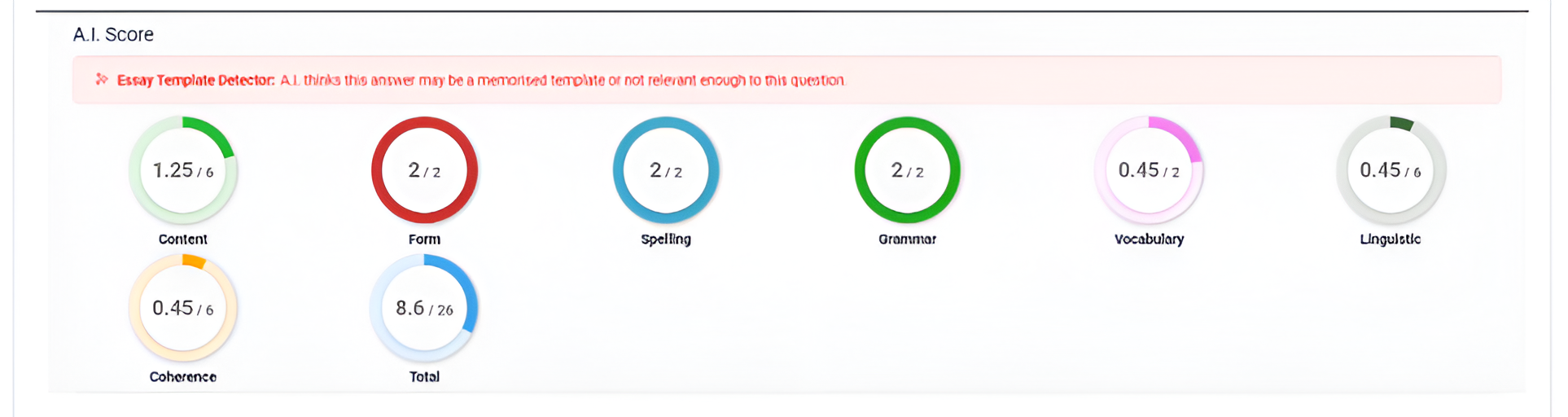
7-Parameter AI Scoring
Real-time scoring breakdown matching Pearson’s exact criteria:
Content
out of 6
Form
out of 2
Spelling
out of 2
Grammar
out of 2
Vocabulary
out of 2
Linguistic
out of 6
Coherence
out of 6
Total
out of 26
- ✨ Essay Template Detector:
A.I. thinks this answer may be a memorised template or not relevant enough to this question.
READING SECTION
Reading
The Writing section is where PTE PRO’s AI truly shines in giving constructive, educational feedback. We don’t just correct your mistakes; we teach you how to write answers that meet PTE’s exacting standards.
All Reading Tasks - Interactive Text
Every reading passage on PTE PRO is interactive. You can click any word you don’t know.
Click-to-Learn Dictionary
Immediately, a small tooltip pops up with:
- Definition: Clear, concise meaning
- Pronunciation: Split into syllables
- Synonyms: Alternative words
- Antonyms: Opposite meanings
- Collocations: Words that often go with it
Example
ubiquitous (adj.)
Present, appearing, or found everywhere
Example: “Phones have become ubiquitous.”
Synonyms: omnipresent, pervasive
Antonyms: rare, scarce
Collocations: ubiquitous presence, ubiquitous computing
- The Benefit:
This feature turns every practice question into a mini vocabulary lesson, reinforcing your language skills while you prep. It’s like having a dictionary and vocabulary trainer built into the exam.
Reading: Fill in the Blanks
PTE fill-in-the-blank questions test your understanding of context, collocations, and grammar. PTE PRO enhances this by providing immediate explanations for your choices.
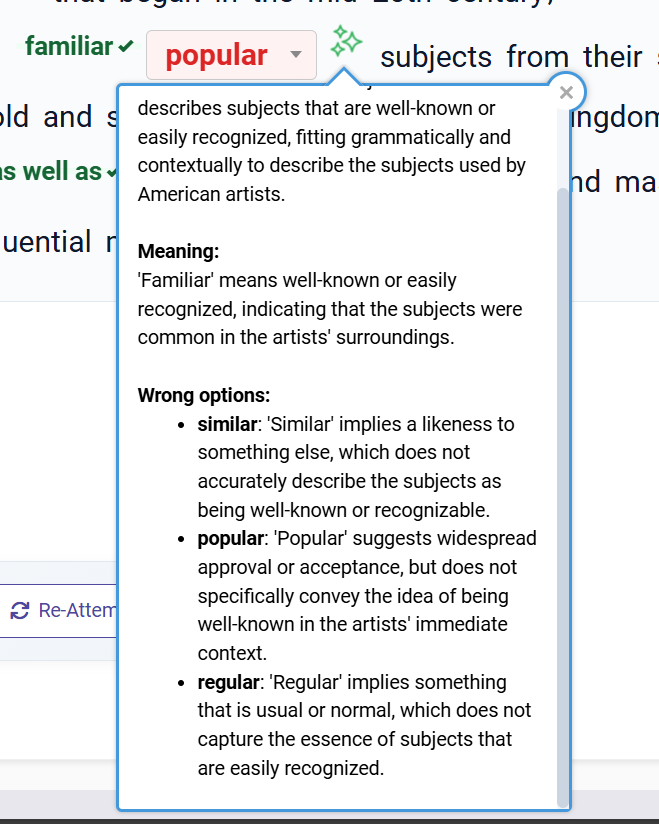
Logic-Reveal Explanations
When you complete a Blank question and submit, the system provides explanations for each blank:
- Example:
Sentence: “The policy had a significant ____ on the economy.”
- You chose: "affect"
Explanation: “‘affect’ (verb) vs ‘effect’ (noun): Here we need a noun, so the correct answer is ‘effect.'”
- ✓ Correct: "effect"
The Result
Every mistake becomes a learning opportunity. You’re not just memorizing the answer—you’re understanding the rule or collocation behind it.
Reading: Reorder Paragraphs
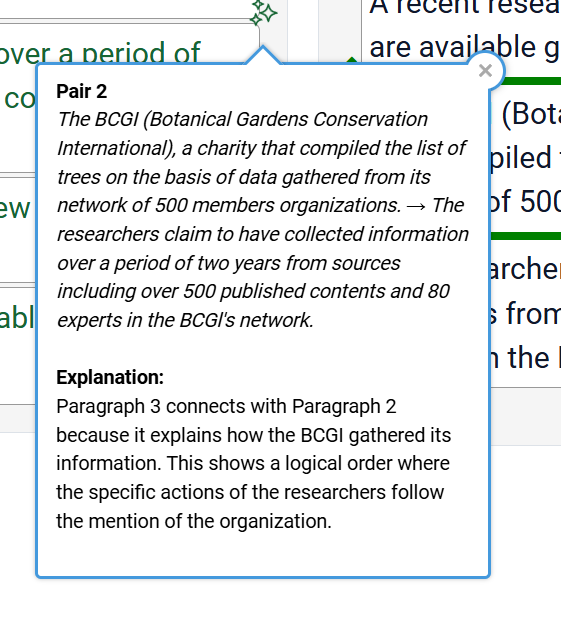
This task is about logically sequencing jumbled paragraphs. PTE PRO adds value by revealing the often hidden logic that links paragraphs.
Pair Logic Explanations
When you submit your order, beyond just telling you the correct order, we show the “Pair Logic”:
- Example explanations:
“Paragraph 3 follows Paragraph 2 because it continues the timeline (notice the year 1990 references the event in Para 2).”
“Para 1 and Para 4 form a logical pair: Para 4 gives an example of the concept introduced in Para 1.”
Learning Outcome
You actually see the rationale for the sequence, rather than scratching your head wondering why your order was wrong. You start to pick up on logical cues: transition words, references, pronouns, chronological order.
Reading: Multiple-Choice (Single/Multiple Answer)
While these are generally straightforward, PTE PRO still provides a learning edge with explanations highlighting clues in the passage that disqualify wrong choices and support the correct one.
- Example explanations:
“The passage states that XX declines after 2010, which contradicts option B that says XX increased.”
LISTENING SECTION
Listening
The Listening section is often where fatigue sets in, but PTE PRO keeps you engaged with intelligent support tools. We help you dissect audio, catch tricky details, and solidify your comprehension.
Summarize Spoken Text (SST)
This task bridges listening and writing—you listen to a lecture and write a summary. PTE PRO emphasizes content and originality.
What We Check
- Did you address the main points of the lecture?
- Grammar and style evaluation
- Use of safe template frameworks from Template Vault
Keyword Coverage Checker
Our AI analyzes your summary against the audio transcript and tells you which keywords you missed. Include these keywords naturally to boost your content score for concise 50-70 word summaries.
Listening: Multiple-Choice & Highlight Correct Summary
These comprehension tasks benefit immensely from PTE PRO’s AI Audio Explainer features.
Distractor Decoder
For wrong choices you selected:
- Why Option C is Wrong:
“Option C mentions ‘global warming’, and the speaker did say that phrase, but only to refute it as a myth—hence C is incorrect.”
Evidence Locator
For the correct answer:
- Evidence for Correct Answer:
“At 0:42 in the audio, the speaker says ‘However, the main benefit is…’ which directly supports option B.”
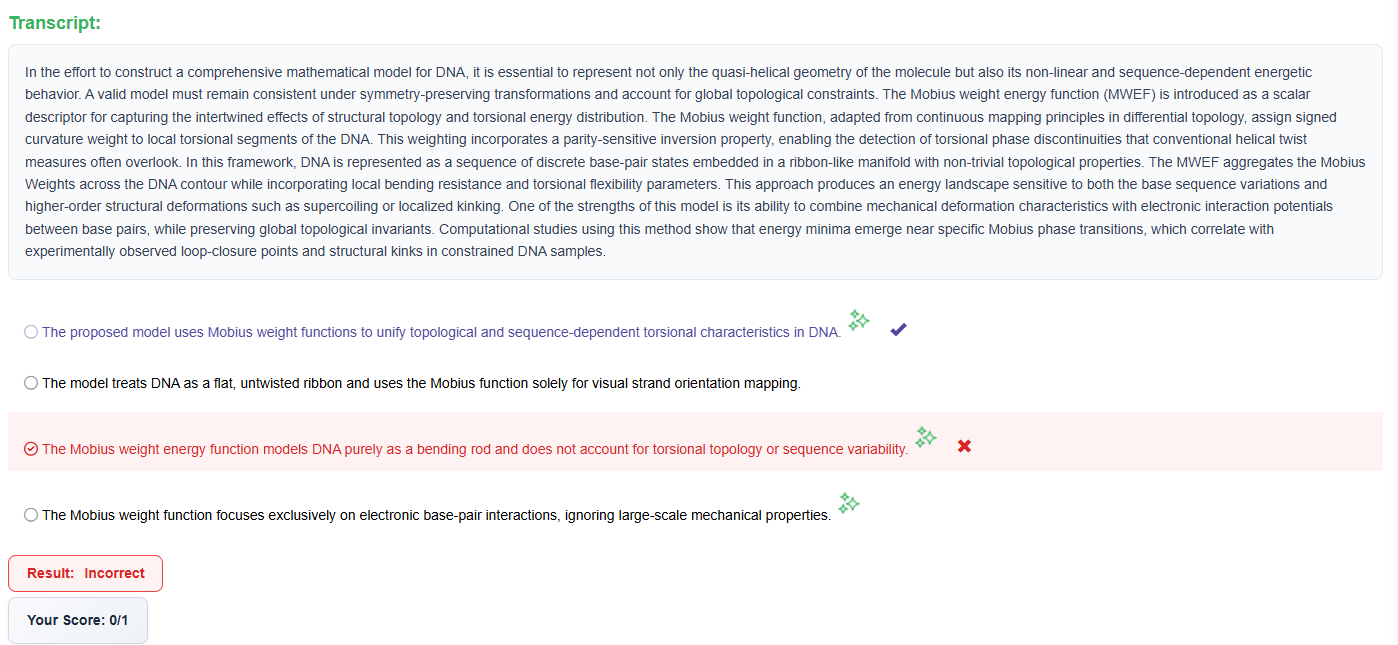
Select Missing Word & Highlight Incorrect Words
Both tasks get detailed visual feedback with transcripts marked to show what you correctly identified and what you missed.
- Visual Feedback:
Transcript marked in green for every word you correctly identified and red for any word you missed or clicked by mistake. Immediate feedback helps you hone attention to detail.
Write from Dictation
Often considered the most crucial listening task (contributes points to both Listening and Writing), WFD is a focus on PTE PRO.
Morphological Error Detection
Our system detects singular/plural mismatches and word form errors:
- Error Detected:
Audio said: “benefits”
You wrote: “benefit”
You missed the plural ‘s’ on this word
This is crucial because missing a plural “-s” is not just a spelling error; it’s a content error that costs points in both Listening and Writing.
Complete Feedback
After submission, you’ll see:
- Transcription alongside the correct sentence
- Differences clearly highlighted
- Missing words marked in red
- Spelling errors underlined
- Extra words you added flagged
- The Result:
By practicing WFD on PTE PRO, you quickly learn to sharpen your memory for exact words and endings, securing one of the biggest point-yielding items in PTE.
Master Every Section with PTE PRO
Specialized AI tools for Speaking, Writing, Reading, and Listening ensure you’re prepared for every task type.
Contact Us
Have Question? We’d Love To Hear From You
Email Us
We will respond within 24 hours.
Location
Brisbane, Queensland
Australia
Support Hours
Monday - Friday
9:00 AM - 6:00 PM AEST
The world’s first AI-driven Next-Gen PTE preparation portal. Fully updated for Pearson’s latest exam changes.
Partner 2025
Platform
Resources
Pearson PTE
Legal
© 2025 PTE PRO. All rights reserved.